A vacancy pipeline is a series of steps that you define based on how you want to evaluate candidates for a vacancy.
First, lets understand different stages of a vacancy pipeline.
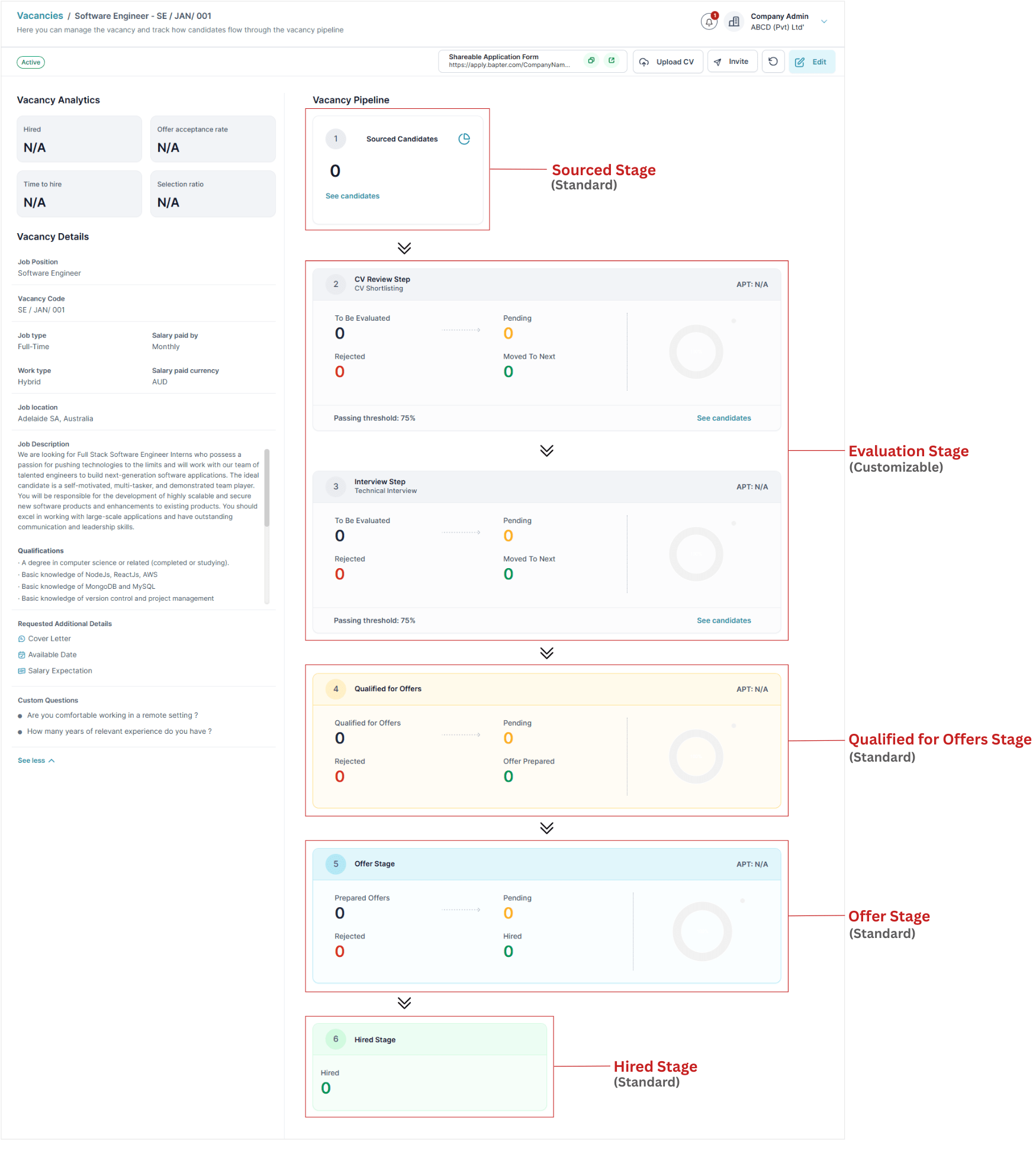
- Sourced Stage – Starting point of the pipeline. This is where candidates enter to the pipeline (next documentation explains how to source candidates to the pipeline). This stage is standard to all vacancies.
- Evaluation Stage – Steps to evaluate candidates such as CV shortlisting, interviews, take-home assignments, etc. For the new vacancy you created, this stage comes empty. You need to add steps as you want to evaluate candidates (next section of this documentation explains how to add evaluation steps).
- Qualified for Offers Stage – All the candidates who has successfully passed Evaluation Stage are kept here. You can prepare offers for selected candidates among them. This is also a standard stage to all vacancies.
- Offer Stage – The candidates who are currently in the middle of processing a job offer. Activities such as internal offer approval, sending offers to candidates, receiving candidate responses are handled here. This is also a standard stage to all vacancy pipelines.
- Hired Stage – The candidates who got hired for the vacancy. This is also a standard stage to all vacancies.
Refer to this illustration to see the different stages of a vacancy pipeline. Please note that the pipeline in this image already has added evaluation steps.
The next step is to add evaluation steps to the pipeline.
Add Evaluation Steps to the Vacancy Pipeline
We assume that you are currently in the vacancy you just created. If yes, follow these steps
- Click on “Edit” button
- Click on the “ + Add Evaluation Step” button.
- Add steps one by one
Depending on how you want to evaluate for the role, add steps from available types. You can decide the sequence and combination of evaluation steps based on your hiring needs.
There are 8 types of evaluation steps, each designed to help you assess candidates in different angles. Below is a brief description of each type.
- Automated CV Filter
- CV Review
- Interviews
- One-Way Interviews
- Quizzes
- External Assignment
- Reference Checks
- Custom Evaluations
Automatically filters out irrelevant CVs based on specified keywords.
Example: If skills of the Java programming language is essential to the role, this filter can automatically reject CVs that don’t mention the word “java.”
Streamlines the distribution of CVs among internal reviewers and collects their feedback. Distribution of CVs and collecting the feedback is automated.
Facilitate online video interviews and in-person interviews. Platform is capable of scheduling interviews with few clicks, automatically sharing interview details with interviewers/candidates, automatically collecting RSVP responses and providing best user experience during interviews.
Platform will automatically collect video recorded answers from candidates to a set of questions prepared by you. The video recorded answers will be available for the hiring team to review later.
Your can create a set of MCQ questions with correct answers marked. Platform will automatically ask candidates to answer them. Since the correct answers are already marked by you, the platform will calculate the marks and pass/fail candidates automatically. Platform uses different techniques to prevent candidates from cheating during answering.
You can request candidates to complete a take-home assignment to assess their skills. The assignment is automatically distributed. Answer submissions also getting collected automatically, allowing your hiring team to review submissions at their convenience.
Collecting referee’s details from candidates and collecting feedback about the candidate from referees is automated.
Covers all other custom evolutions such as phone screening, in-person tests, etc.
After adding evaluation steps, the next step is to set up welcome and rejection emails. However, this step is optional
Setup Automated Emails with Vacancy Pipeline (Optional)
There are two types of automated emails you can configure for a vacancy pipeline
- Welcome email : – Automatically acknowledges receipt of a candidate’s CV and notifies them that their evaluation has began. Enabling this will enhance the candidate experience which will increase the chance of finding the best talent.
- Reject Email :- Notifies candidates when they are rejected through the pipeline. Enabling this will also increase the candidate experience. Because even though they are not the right fit for this role, this will make sure they will keep applying for future roles in your company that they will be a perfect fit.
HireTrace provides default email templates that you can use or customize to suit your needs. Use the placeholder {candidate_first_name} to include the candidate’s first name in the email.
Now your vacancy pipeline is ready to start evaluating candidates for the role. The next step is to activate the vacancy and source candidates. Follow us to the next documentation.